Categories
Automation

How to Automate Client Reporting: A Step-by-Step Guide for Agencies

Introduction

Most agencies don’t set out to spend hours every month copy-pasting numbers into a slide deck, it just happens gradually, one client at a time, until reporting quietly becomes one of the biggest time drains on the team. How to automate client reporting isn’t complicated, but it does need to be set up properly the first time so it keeps working without babysitting. Here’s exactly how to do it.

Step 1: Audit What You’re Currently Reporting On

Before automating anything, list out every metric currently included across your client reports and where that data lives, Google Ads, GA4, Meta Ads, LinkedIn Ads, Google Search Console, and so on. Most agencies discover during this step that they’re manually re-pulling the same five or six metrics for every client, which is exactly the repetitive work automation is built to remove.

Step 2: Connect Your Data Sources Once

A proper reporting tool connects directly to each ad and analytics platform so data flows in automatically instead of being exported and re-uploaded every cycle. This is typically a one-time setup per client: authorise the connection, and the tool keeps pulling fresh data on schedule from then on.

Step 3: Automate Client Reporting Template Once, Reuse It Everywhere

Instead of designing a new report for each client, use a fixed template with your standard metrics and branding, then apply it across your client base. Most reporting platforms let you clone and lightly customise a template per client, which is far faster than starting from a blank report each time.

Step 4: Automate Client Reporting Narrative, Not Just the Numbers

This is the step most agencies skip, and it’s the one that saves the most time. Charts alone still require someone to look at the data and write a paragraph explaining what happened and why. Tools like DataMyth generate that explanation automatically, turning a raw data table into a report a client can actually read and understand without a call to interpret it.

Step 5: Schedule Automatic Delivery

Set reports to generate and send on a fixed schedule, weekly, bi-weekly, or monthly, so delivery no longer depends on someone remembering to hit send. Most platforms support PDF export and direct email delivery, and some offer a live client portal as an alternative to a static file.

Step 6: Review, Don’t Rebuild

Once automation is running, your team’s job shifts from building reports to reviewing them, a five-minute skim before delivery rather than hours of manual assembly. This is where most of the time savings agencies report actually come from.

Conclusion

How to automate client reporting isn’t about removing your team from the process, it’s about removing the repetitive, low-value parts so the time your team does spend is on judgment calls, not data entry. Agencies that automate both the numbers and the narrative typically see the biggest time savings, since writing commentary is usually the slowest part of the old process.

Frequently Asked Questions (Faqs)

How long does it take to automate client reporting?

Initial setup, connecting data sources and building your first template, typically takes anywhere from a few minutes to a few hours per client, depending on how many platforms you’re pulling data from. After that, reports generate automatically with no extra setup time.

What data sources can be automated into a client report?

Most modern reporting tools connect to the major advertising and analytics platforms agencies use daily, including Google Ads, Google Analytics 4, Meta Ads, LinkedIn Ads, and Google Search Console.

Can automated reports still be customised for each client?

Yes. Automation typically applies to data pulling and report generation, not branding, most platforms let you white-label each report with your agency’s or client’s own logo, colours, and layout.

How much time do agencies actually save by automating reporting?

Industry estimates suggest marketers can spend around 7.5 hours a week building reports manually. Automating data collection and, ideally, the written analysis as well removes the majority of that time.

Do automated reports explain why performance changed, or just show the data?

It depends on the tool. Basic automation only pulls and charts data, leaving interpretation to a person. More advanced platforms, including DataMyth, automatically generate the written explanation behind each change, closing the gap between data and insight.

Categories
Automation

7 Benefits of Automating Reporting for Digital Marketing Agencies

Digital marketing agencies are constantly under pressure to deliver results for their clients. You need to be able to track and analyze data from a variety of sources to make informed decisions about your campaigns. However, manual reporting can be time-consuming and error-prone.

Automated reporting solutions can help digital marketing agencies save time, improve accuracy, and get more insights from your data. A study by the Aberdeen Group found that agencies that use automated reporting solutions are 20% more likely to exceed their revenue goals than those that do not. 

Here are seven benefits of using automated reporting for digital marketing agencies:

Save time:

Automated reporting solutions can save agencies hours each week by automating the process of gathering, analyzing, and presenting data. This frees up time for agencies to focus on more strategic tasks, such as developing and executing marketing campaigns.

Improve accuracy: 

Automated reporting solutions can help agencies improve the accuracy of your data by eliminating human error. This is important to make informed decisions about campaigns and provide accurate reports to clients.

Get more insights from data: 

Automated reporting solutions can help agencies get more insights from the data available by providing you with visualizations and other tools to help analyze the data. This can help agencies identify trends, patterns, and opportunities that you might not have otherwise seen.

Scale easily: 

Automated reporting solutions can scale easily as agencies grow and add more clients. This is important for agencies that want to be able to handle a growing number of clients without having to hire more staff.

Improve client communication: 

Automated reporting solutions can help agencies improve client communication by providing clear and concise reports that are easy to understand. This can help agencies build trust with your clients and demonstrate the value of your services.

Stay ahead of the competition: 

Agencies that use automated reporting solutions can stay ahead of the competition by leveraging the latest marketing insights to optimize campaigns. This can help you deliver better results for your clients and win new businesses.

Free up resources: 

Automated reporting solutions can free up resources for agencies to focus on more strategic tasks, such as developing and executing marketing campaigns. This can help agencies be more efficient and operate more effectively.


In conclusion, automated reporting solutions can offer a number of benefits for digital marketing agencies. By saving time, improving accuracy, getting more insights from data, scaling easily, improving client communication, staying ahead of the competition, and freeing up resources, automated reporting solutions can help agencies streamline operations, improve decision-making, and deliver better results for clients.

Categories
Automation Marketing

Unlock The Power Of Data-Driven Marketing

Are you looking to unlock the power of data-driven marketing? Employing data-driven marketing is one of the most beneficial approaches for ascertaining insights about your customers and creating custom, productive strategies. In this blog post, we will explore how data-driven marketing can help you succeed. We’ll discuss what it is, its benefits, how to analyze your audience and craft targeted messaging, automate processes, track results and come to a conclusion. By the end of this post, you will have information needed to start using data-driven marketing in your business!

What Is Data-Driven Marketing?

Data-driven marketing is a modern approach to marketing that leverages various data sources, such as customer interactions, site analytics, and social media insights, to develop marketing strategies. This technique enables marketers to better understand their customers’ behavior & preferences and discover new opportunities for growth. By utilizing data-driven tactics, marketers can create more informed campaigns that have a greater impact on the bottom line. Data-driven marketing also helps with optimizing existing campaigns and measuring the success of past efforts in order to get maximum return on investment.

Analyzing Your Audience

Before you can unlock the power of data-driven marketing, it’s important to understand who your audience is and analyze their behavior. Knowing who your target audience is, what their interests are, and how they respond to different messages will allow you to tailor your communications in a way that will yield better results. Understanding the customers’ buying patterns can also help identify opportunities for growth and discover new areas of focus or strategies that could lead to increased sales. By analyzing your audience’s behavior, you can create more effective campaigns that drive strong ROI for your business.

Crafting Targeted Messaging

Marketing that is driven by data is a powerful asset in today’s digital age. Crafting targeted messaging helps you unlock its full potential allowing you to effectively communicate and reach your target audience. The key to crafting successful messages is understanding who your target market is – their demographics, interests, and pain points – so you can tailor content to match their needs. Once you understand your audience, you can create messages that are meaningful and impactful for them, resulting in higher engagement rates and more conversions. With the right data-driven marketing strategy in place, you’ll be able to successfully reach your desired customers and maximize the effectiveness of your campaigns.

Automating Your Processes

Data-driven marketing is all about utilizing data to make informed decisions and uncover powerful insights, so it makes sense to automate these processes. Automation helps streamline arduous tasks like data analysis, while also reducing human error and freeing up your team’s time to focus on more strategic initiatives. Additionally, automation can help optimize the customer experience by delivering content at precise moments in their journey. Automation is a great way to unlock the power of data-driven marketing – and increase your ROI! This is where tools like DataMyth can help automate data analysis.

Tracking Your Results

Tracking your results is key to unlocking the power of data-driven marketing. Keeping an eye on metrics like visibility, click throughs, leads, sales, ROI, and customer engagement will give you a clear picture of how successful your campaigns are. It’s important to be able to distinguish between what works and what doesn’t—plus identify any areas for improvement. Look for trends in the data that can help inform your future decisions. Doing so will enable you to refine and optimize campaigns for maximum effectiveness.

Conclusion

The conclusion of this article is that data-driven marketing is a powerful approach that can be used by businesses of all sizes to optimize their marketing efforts and reach their target audiences. When leveraged correctly, this type of marketing can help companies create a better customer experience and develop effective marketing strategies. By understanding the core concepts and using available resources such as analytical tools, businesses can unlock the power of data-driven marketing for maximum results.

Categories
Automation Reporting

3 Reasons to Automate Your Digital Marketing Reports

As a digital marketer one has to create daily, weekly and monthly reports. Even though it may feel monotonous it is a critical part of your business. As per a survey conducted by DataMyth, we found that companies spend an average of 7.5 hours a week building various digital marketing reports with analysis which is almost an entire day every week. So you have a resource who spends time building reports  wherein he/she could spend this time optimizing campaigns or taking up additional responsibilities.  While you may figure out ways to automate your reports, you still need to analyze the data and present it to your client/stakeholders. What if you figure out a way to automate this entire process (report generation to analysis)? This blog will introduce you to automating reports, its advantages, and ways you can do so.

Reporting Automation in Simple Terms 

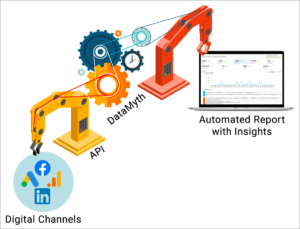
Connect all your digital channels to a software/platform that builds your daily, weekly and monthly marketing reports within seconds/minutes.  All digital channels provide APIs that fetch your data and the automated reporting software/platform builds your report. 

Why should you automate your reports?

  1. Hours of reporting reduced to seconds
    1. We’ve discussed how the time taken to build your reports can be reduced to seconds. You can end the blind data ‘copy-paste’, downloading various csv files and analyzing the data to identify insights. With automated reporting, ready to use reports will be available at the click of a button within seconds. 
  2. Focus on new initiatives
    1. Now that the reporting is automated with performance insights, you know exactly what is working and what is not. You can spend your precious time on optimizing & taking on additional initiatives for your business. 
  3. Increase your team’s effectiveness
    1. For agencies, you can increase the number of clients handled per analyst, and brands, you can focus on additional initiatives with small & agile teams

Which tool is best for me?

There are a lot of tools available in the market right from BI (Business Intelligence) dashboards to reporting solutions. 

  • While BI tools provide full funnel reports, they are complicated to set up and need to be maintained by SMEs/experts.
  • Dashboard tools (like Google Data Studio) are not as complicated as BI tools, but not easy to use. You can connect your channels & create dashboards but you might need to pay in order to connect the channels 
  • Many reporting tools available in the market let you drag and drop KPIs & graphs creating a simple dashboard ready to be shared with your client. This is easy to use, needs a one time setup & the user friendliness depends on the tool.

All the above mentioned tools provide the data you need in various templates (some are fixed & some offer custom templates), but once you receive the data in the desired format, you spend significant time analyzing the data which most of the tools do not provide.

Here’s where DataMyth can help. Created by marketer who wanted to skip downloading, processing and analyzing data. It’s an easy to use tool with pre-built templates for each channel (Google Ads & Google Analytics to start with) with automated analysis and performance insights for the KPIs which matter the most to marketers. Reports built with DataMyth can be downloaded as a PDF & shared with stakeholders/clients.

While this may sound too good to be true, have a look at how we simplify your process below, and take the 7 day free trial to see for yourself.