A thermometer tells you a patient has a fever. It does not tell you whether it’s the flu or an infection. Most paid search reports, and the paid search KPIs inside them, are thermometers.
Conversions fell 18% last month. The report shows CTR roughly flat and CPC up 7%. The client asks the only question that matters, “why?”, and the report has no answer. The account manager starts guessing in a reply email, because the paid search KPIs in the report can’t explain anything.
The problem isn’t effort. It’s that the standard set of paid search KPIs (clicks, CTR, CPC, conversions, cost per conversion) describes outcomes without explaining them. A small group of diagnostic metrics, available in every Google Ads account and ignored in most client reports, does the explaining. This guide covers those paid search KPIs, how to read them together as a diagnostic tree, and how to show them to clients without drowning anyone.
CTR and CPC are the most-reported paid search KPIs, and they are compound metrics. CTR moves when your ad copy changes, but also when your position shifts, when the mix of queries changes, or when a competitor writes a better ad. CPC moves when you bid differently, but also when competition intensifies or your Quality Score slips.
So when these paid search KPIs change, you know that something happened. You don’t know what. Reporting them alone is like a doctor reading out your temperature and sending you home.
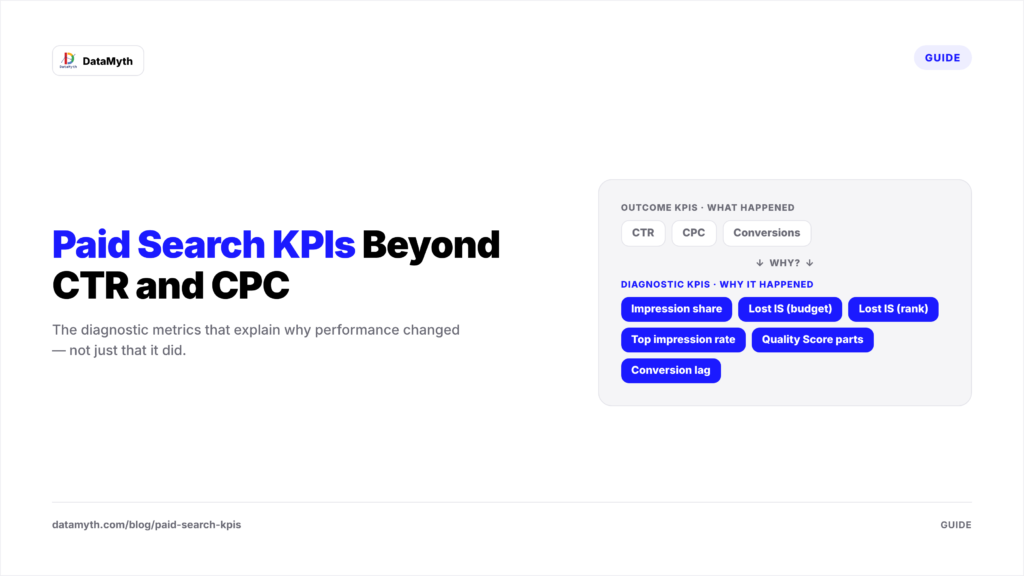
Good paid search KPIs split into two tiers. Outcome KPIs tell the client whether the money is working. Diagnostic KPIs tell the agency why. The best reports use both, in that order.
These six paid search KPIs turn “conversions dropped” into “conversions dropped because…”
Impression share is the percentage of impressions your ads actually received out of all the impressions they were eligible for. Google’s explanation of impression share describes how eligibility is estimated from targeting, approval status and quality.
Why it matters: it reveals headroom. A campaign with 92% impression share has little room to grow by spending more. A campaign at 45% is leaving half its market on the table. Of all paid search KPIs, this is the one that most often changes a budget conversation.
The share of eligible impressions you missed because your budget ran out. If this is high on a profitable campaign, the fix is simple and pleasant: more budget. Among paid search KPIs, it’s the most persuasive number you can show a client who wants growth.
The share you missed because your Ad Rank was too low, which reflects bids, ad quality and expected impact of extensions. A rising lost-to-rank number usually means a competitor entered the auction, your Quality Score fell, or your bids fell behind. Of all the paid search KPIs here, this is where many unexplained CPC increases begin.
These show what percentage of your impressions appeared above the organic results, and in the very first position. Position affects CTR dramatically, which makes these paid search KPIs essential context, so a drop here often explains a CTR decline that looks like a creative problem but isn’t.
Instead of the single 1–10 Quality Score, look at its three components: expected CTR, ad relevance and landing page experience. Each points to a different fix: copy, keyword grouping or the website itself. Tracking these paid search KPIs at the keyword level for your top spenders catches decay before it inflates CPC.
Many conversions arrive days after the click. If your client’s typical lag is five days, the last week of every report will always look weak. Knowing the lag prevents false alarms in your paid search KPIs and stops agencies from “fixing” campaigns that were working fine.
Individual paid search KPIs are useful; reading them in sequence is powerful. When conversions drop, walk this path:
Five questions, five minutes, and the report moves from describing to diagnosing. This is the real value of diagnostic paid search KPIs: they shorten the distance between a number and a decision.
A B2B software client’s non-brand search conversions fell from 140 to 112 month over month. CTR dipped from 4.1% to 3.8%. CPC rose from $6.20 to $6.90.
The outcome-level paid search KPIs alone suggest “ads are getting more expensive.” The diagnostic layer tells a sharper story:
Diagnosis: a new, aggressive competitor pushed the client down the page, which cut CTR, raised CPC and reduced volume. The recommendation writes itself: defend top terms selectively, tighten keyword-to-ad relevance to lift Quality Score, and shift budget toward terms where the competitor isn’t present. The client gets an explanation and a plan instead of a shrug.
The outcome tier of paid search KPIs should change with the client’s business. The diagnostic tier mostly stays the same.
Always separate brand from non-brand campaigns. Brand search converts cheaply because the customer already chose you, and blending it with non-brand makes overall performance look better than the growth engine really is.
Not every client wants to learn what “search lost IS (rank)” means, and they shouldn’t have to. Use a two-tier layout for paid search KPIs:
Our guide to building a Google Ads report non-technical clients understand goes deeper on the language side. For how search fits alongside social and other channels, see our cross-platform paid media report structure.
CTR and CPC aren’t wrong; they’re incomplete. Pair outcome metrics with a small set of diagnostic paid search KPIs (impression share, lost IS by budget and rank, position rates, Quality Score components and conversion lag) and your reports stop saying “something happened” and start saying “here’s why, and here’s what we’ll do.” That shift is what clients actually pay an agency for. For the wider metric set across channels, see our list of digital marketing KPIs every agency should track.